FOR UBER, DIDI AND INDRIVE DRIVERS

Does that trip pay you fairly?

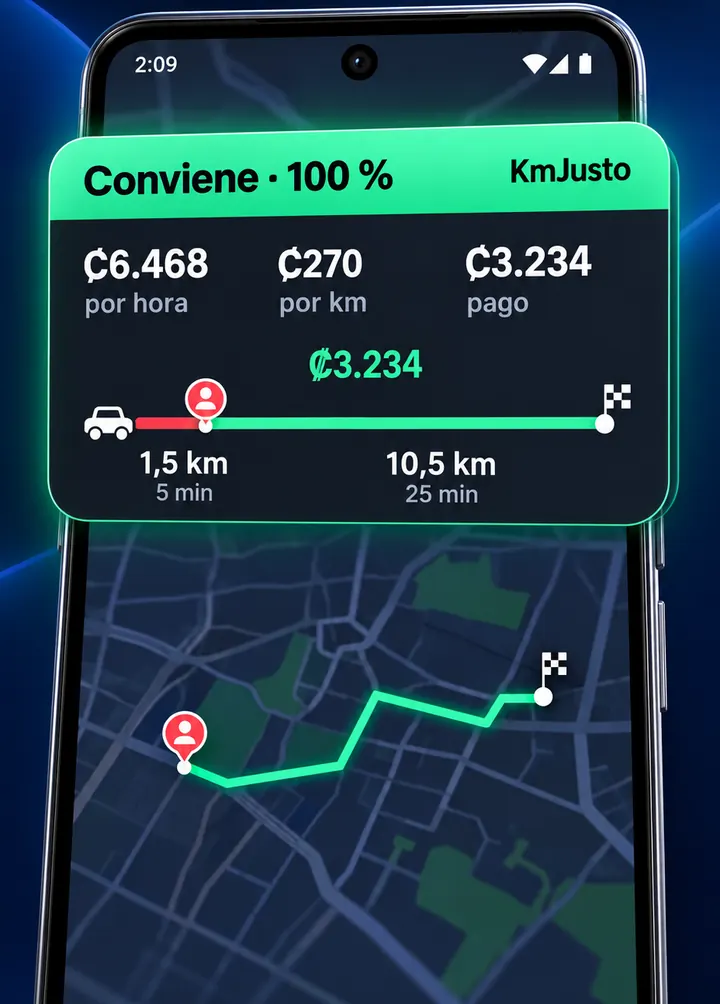
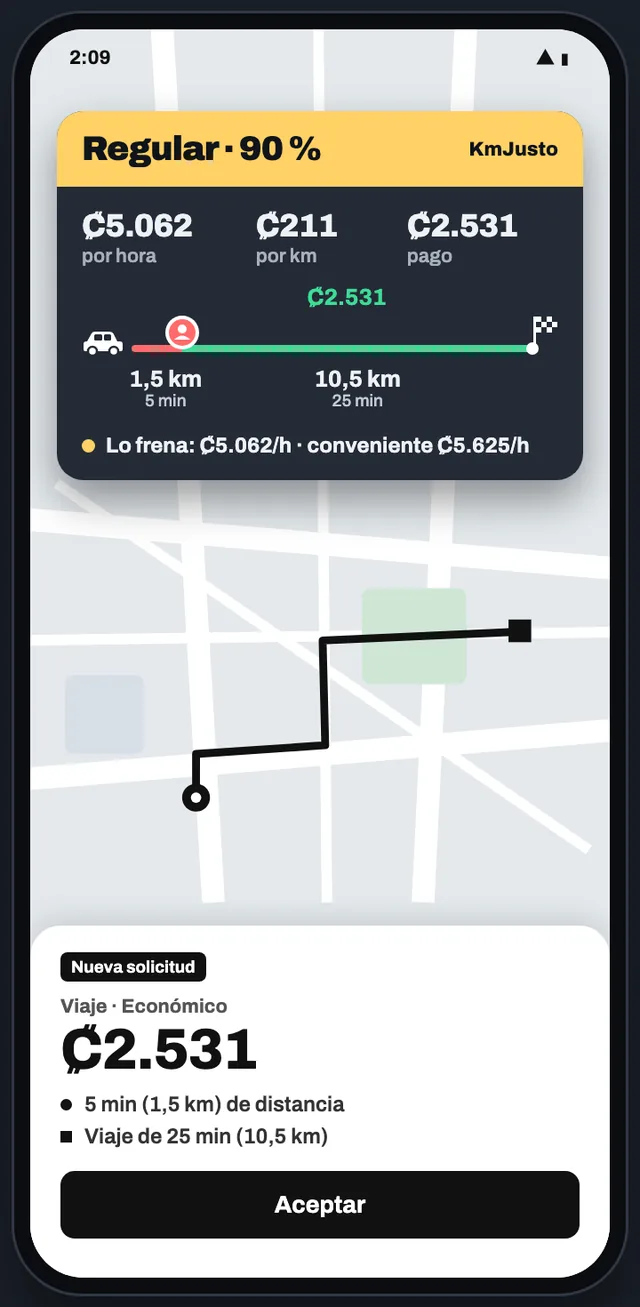
KmJusto reads the offer on your screen and instantly puts a color on top: green, yellow or red, based on your minimums per hour and per kilometer.

Get it on Google PlayTry it 7 days free
QR code to install KmJusto from Google PlayScan with your Androidand Google Play opens
  • No card to try it
  • Never accepts or declines for you
  • Reading stays on your phone
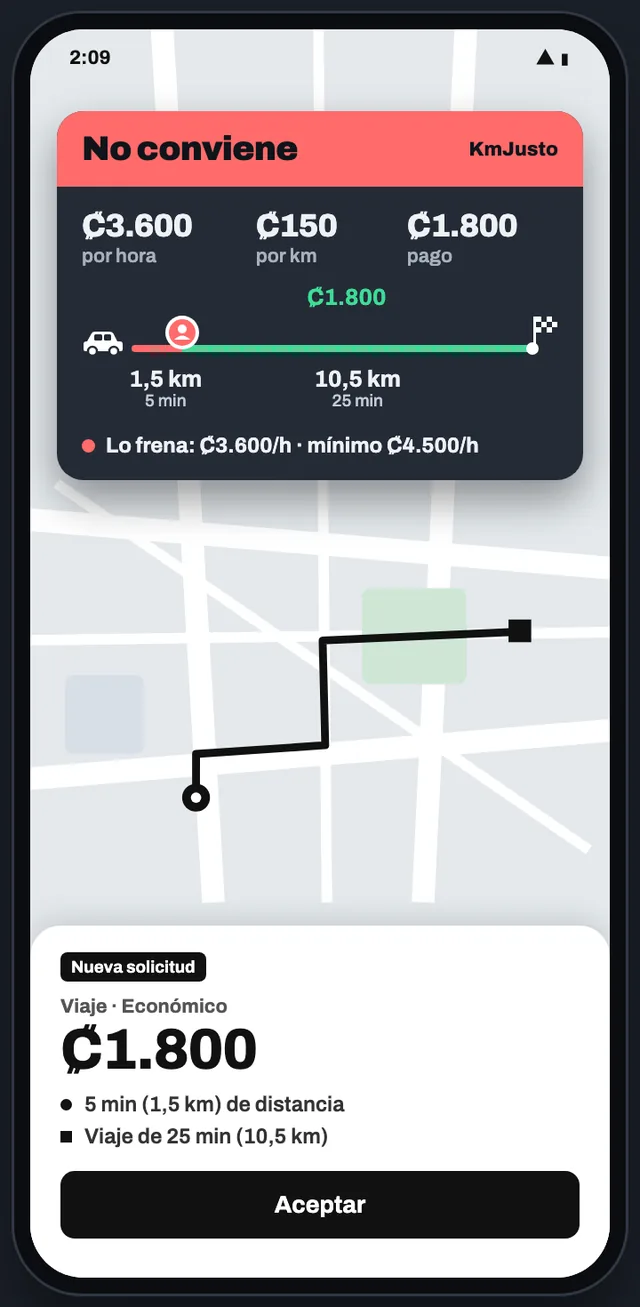
Example: KmJusto bubble in red, "Not worth it", over a trip offer

Illustrative example. Colors change with your minimums.

Reads offers from
  • Uber
  • DiDi
  • inDrive
  • Cabify
  • 99
  • Lyft
  • Rappi
  • PedidosYa
  • iFood
  • DoorDash
Rides and deliveries. You choose which ones are read.

THE PROBLEM

Same fare.
Opposite result.

The app shows the price in big numbers, but what matters is how much you make per hour and per kilometer counting the pickup. Doing that math in 10 seconds, with the car moving, isn't fair.

Offer A$6.00
Pickup1 km · 3 minTrip9 km · 22 min
Worth it$14.40/h$0.60/km

Close pickup: almost all the time is paid trip.

Offer B$6.00
Pickup8 km · 20 minTrip9 km · 22 min
Not worth it$8.57/h$0.35/km

Almost half the distance is driving to the pickup, unpaid.

Example with minimums of $9/h and $0.40/km. KmJusto does this math for you on every offer.

HOW IT WORKS
Three steps.
Two minutes.

  1. 01

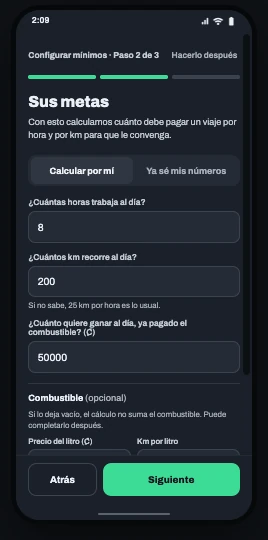
    Say how much you want to make

    A 3-step assistant works out your minimums from your hours, kilometers and what you want to keep each day. Or set them yourself.
  2. 02

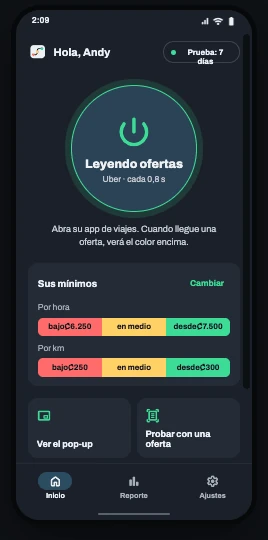
    Turn on the reader

    One tap and you're back in Uber, DiDi or inDrive. KmJusto watches the screen for offers without touching the ride app.
  3. 03

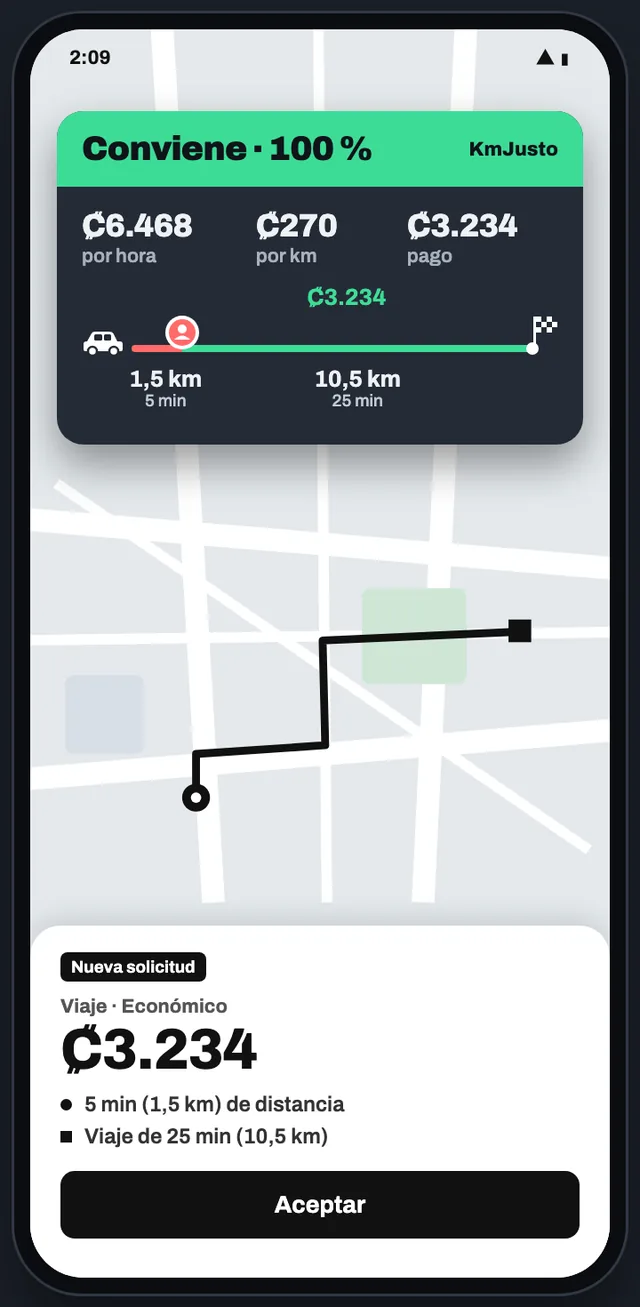
    See the color and decide

    The bubble appears over the offer: color, earnings per hour, per km and why. If you like, with sound only on green.

FEATURES

Set it up once.
Then just look at the color.

Fit KmJusto to your car and the way you work, with the car stopped. On the road, the color tells you whether the offer is worth it.
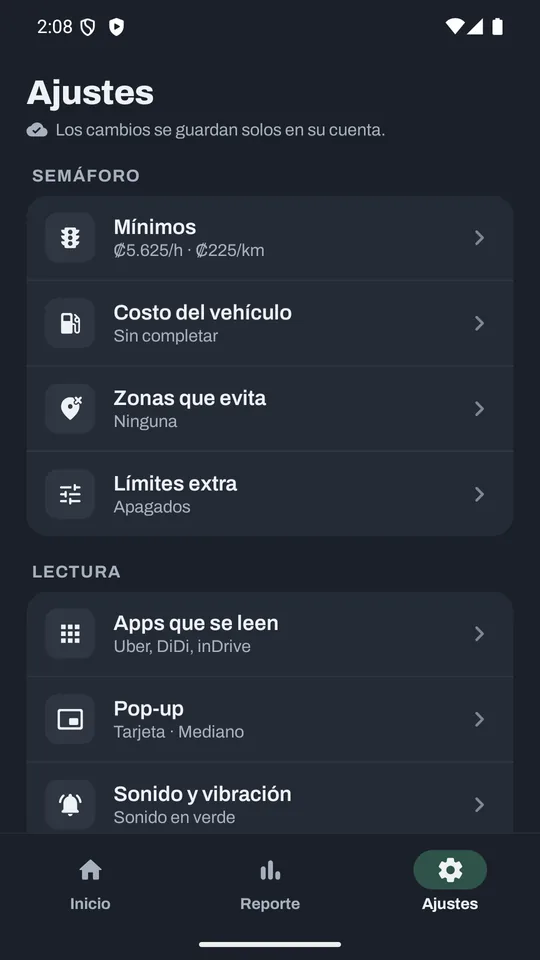
KmJusto Settings screen: minimums, vehicle cost, zones to avoid, limits, apps and pop-up

Your traffic light

A traffic light with your numbers

Minimum and target per hour and per km. Below the minimum, red; from the target up, green.

What you keep

Enter fuel, mileage and maintenance: KmJusto subtracts what each km costs you.

Zones you avoid

If the pickup or destination mentions a zone on your list, it shows red.

Extra limits

Minimum fare, maximum pickup or maximum trip. Leave them empty if you don't need them.

While you drive

Pop-up your way

Card, pill or bubble. Size, transparency, time on screen and position.

No need to look

Sound and vibration by color. Recommended: sound only when it's green.

After your shift

Your report

How many offers you saw, which colors, your best hour and why some were red.

AI summary

Your day in plain words, and an assistant to ask about your numbers.

Your currency, your language

Colones, dollars and other currencies; km or miles; Spanish or English.

PRO WHAT THE TRAFFIC LIGHT DID FOR YOU

See in money how much choosing well is worth.

KmJusto Pro replays your shift twice with the same offers you saw: once taking the first one that came, once letting the red ones go. The difference is what the traffic light earned you, with fuel and wear already subtracted.

  • Expenses from a photo of the receipt. Read on the phone; only the amount is kept.
  • Earnings and balance. What you made minus what you spent, by day or by dates.
  • Reminders. Registration, inspection, oil, insurance and license, on time.
  • 30-day and date-range reports and a weekly recap every Monday.

What the traffic light did for you · Today

+$12.60more than taking any offer that came

Choosing with the traffic light
$76.80 · 9 trips
Taking the first one that came
$64.20 · 11 trips

Skipped 4 red trips: 1.6 h of driving for little.

Illustrative example. The math uses the offers you saw; KmJusto doesn't know which ones you accepted.

Driver smiling inside the car, phone in hand

YOU'RE IN CHARGE

KmJusto informs.
You decide.

It never accepts or declines trips, never touches the ride app and never handles your account. It only reads what's already on your screen and shows you clear numbers.

Set it up with the car stopped. While driving, the color and the sound are enough.

PRIVACY

Your screen
stays on your phone.

Everything is read on the phone

The capture and the offer text are processed on your Android and discarded right away.

No images on servers

Screenshots and addresses are never uploaded. Only numbers like fare, km and minutes, for your reports.

You control the reader

Turn it on and off with one tap. Set how often it checks the screen to save battery.

Read the full privacy policy

PLANS

Start free.
Stay if it helps.

For the first 7 days you get all of KmJusto Pro, no card needed. Then pick a plan on Google Play, where you'll see the final price in your currency.

KmJusto

Know in an instant whether an offer is worth it.

US$4.50/ month

or US$10.99 every 3 months

  • Traffic light on Uber, DiDi, inDrive and more
  • Your minimums per hour and per km
  • Vehicle cost, zones to avoid and limits
  • Today, yesterday and 7-day report
  • 1 AI summary a day
Try 7 days free

KmJusto Pro

Recommended

See what choosing well is worth and keep your numbers straight.

US$7.49/ month

or US$17.99 every 3 months

  • Everything in KmJusto
  • How much the traffic light saved you, in money
  • Expenses, earnings and what you keep
  • 30-day and date-range reports, plus a weekly recap
  • Reminders: registration, inspection, oil change, insurance
  • 2 fuller AI summaries a day
Try 7 days free

Reference prices in US dollars. Compare plans in detail

FAQ

What people ask most

How do I know if an Uber trip is worth it?
Compare what it pays against the total time and kilometers, counting the pickup: that gives your earnings per hour and per km. If it's below your minimum, it isn't worth it. KmJusto does that math on every Uber, DiDi or inDrive offer and shows it as a color.
How much should I charge per kilometer?
It depends on your car and how much you want to make: add what each km costs you in fuel, maintenance and wear, then add your profit. KmJusto's assistant works out your minimums per hour and per km with your own numbers.
Does KmJusto accept or decline trips for me?
No. KmJusto only shows information about the offer. You accept or decline in your ride app, as always.
Which apps does it work with?
Uber, DiDi and inDrive, and it also reads offers from Cabify, 99, Lyft, Rappi, PedidosYa, iFood and DoorDash. Reading can vary with the app, the language and the offer's design. In Settings you choose which ones it reads.
Do I need a card for the free trial?
No. Install it, create your account with Google or your e-mail and you get 7 days with all of KmJusto Pro. If you don't pay afterwards, the reader pauses and your settings stay saved.
Which permissions does it ask for, and why?
Display over other apps (for the bubble), read the screen (to see the offer; choose entire screen) and, if you want, no battery optimization (so Android doesn't stop the reader).
Does it use a lot of battery or data?
Reading happens on the phone, with no internet. You choose how often it checks the screen: less often uses less battery.
Does it work on iPhone?
For now only on Android 8 or later.
How do I cancel?
From Google Play › Payments & subscriptions. Uninstalling the app doesn't cancel the subscription.

START TODAY

Your next offer,
with clear numbers.

7 days free with all of Pro. No card. Cancel anytime.

Get it on Google PlayInstall KmJusto
QR code to install KmJusto from Google PlayOn a computer? Scanand Google Play opens

Questions? Message us on WhatsApp +506 6126-1958